The Client-Server Model is a network architecture in which clients send requests for resources or services, and servers process these requests, returning the required responses.
- Client: A device or program that requests data or services (e.g., web browser).
- Server: A system that stores resources, manages data, and responds to client requests.
- Request–response mechanism: Communication follows a structured cycle — client requests, server responds.
- Centralized management: Data and services are controlled from servers, improving security and consistency.
Working
The client-server model works on a request–response flow where a client requests a service/data and the server processes that request and returns a response.
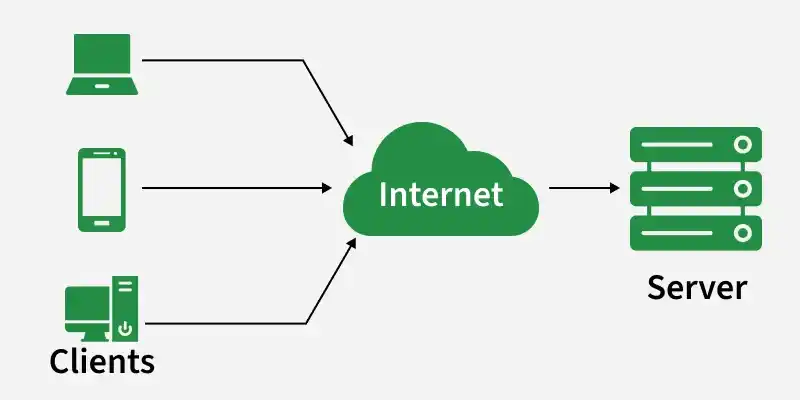
- Client is a device/app that requests services from a server, like a web browser or email app.
- Server is a system that listens for requests and responds by sending data or performing operations.
- Servers can handle many clients at the same time using concurrent request handling.
- Example client apps include Chrome/Firefox and Gmail/Outlook.
- Example servers include web servers (Apache/Nginx), email servers, and database servers.
How Client-Server Communication Works in C++
In C++, sockets are used for communication between the client and the server over a network.
Example:
Server Code (server.cpp)
Client Code (client.cpp)
How a Browser Interacts With a Server
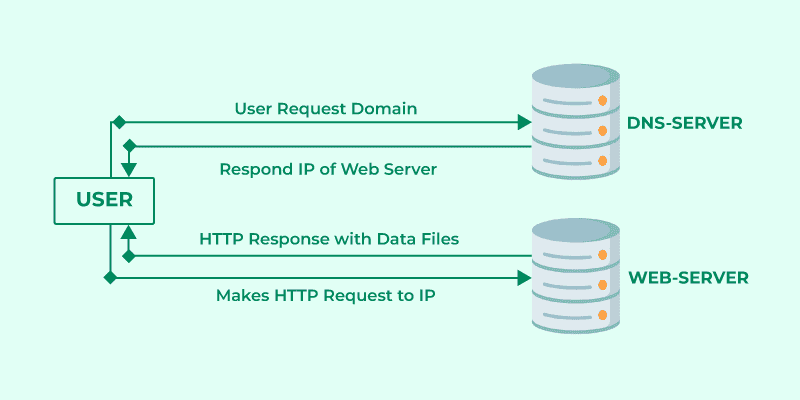
- User enters a URL in the browser (example: www.example.com).
- Browser performs a DNS lookup to convert the domain name into an IP address.
- Browser establishes a connection and sends an HTTP/HTTPS request to the server using that IP.
- Server responds with website resources like HTML, CSS, JavaScript, and images.
- Browser renders the webpage by processing these files and displaying the content.
Types of Client-Server Architecture
Client-server architecture is commonly classified by how many layers handle presentation, logic, and data.
1. 2-Tier Architecture
In a 2-tier architecture, the client communicates directly with the server, which is typically responsible for both processing and data storage.
- It consists of two layers: the client layer and the server layer.
- The client handles the user interface and may perform some processing before sending requests.
- The server processes client requests and manages the database.
- This architecture is suitable for small applications and environments with limited users.
- However, it becomes difficult to scale and manage when many clients connect to the server simultaneously.
2. 3-Tier Architecture
In a 3-tier architecture, the system is divided into three layers to improve performance, security, and scalability.
- It consists of the presentation layer (client), application layer (business logic), and data layer (database server).
- The client interacts with the application server instead of communicating directly with the database.
- The application server processes requests, applies business logic, and retrieves or stores data in the database.
- This structure enhances security because the database is not directly exposed to clients.
- It is widely used in web applications and enterprise systems due to its flexibility and easier maintenance.
Advantages
- It centralizes data and services, which makes management and updates easier.
- It improves security because access control and authentication can be enforced on the server.
- It supports multiple clients at the same time, so many users can use the same service concurrently.
- It makes data sharing consistent because clients get information from a single trusted source.
- It becomes easier to maintain because most changes can be done on the server without updating every client.
Limitations
- It creates a dependency on the server, so services may stop if the server fails.
- It can become a bottleneck when many clients send requests at the same time.
- It requires higher server cost because servers need strong hardware, storage, and continuous availability.
- It needs network connectivity, so poor networks can reduce performance or block access.
- It can be complex to scale properly because load balancing, replication, and backups may be required.
Applications
- Web browsing uses browsers as clients and web servers to deliver webpages and APIs.
- Email systems use email clients and mail servers to send, store, and retrieve messages.
- Online banking systems use mobile/web apps to access secure banking servers.
- Social media platforms use client apps to request feeds, posts, and media from backend servers.
- Cloud storage services use client apps to upload, download, and sync files from storage servers.
- Database-driven applications use clients to query and update data stored on database servers.