Seamless network connectivity is achieved by automatically assigning IP addresses and configuration settings to devices using the Dynamic Host Configuration Protocol (DHCP).
- Assigns a unique IP address to each device.
- Provides the subnet mask to define the local network range.
- Configures the default gateway for communication outside the local network.
- Supplies DNS server addresses for domain name resolution.
Components
DHCP works using a client–server model where the client requests network setting, the server allocates them from an address pool, and the settings are delivered as options for a fixed lease time.
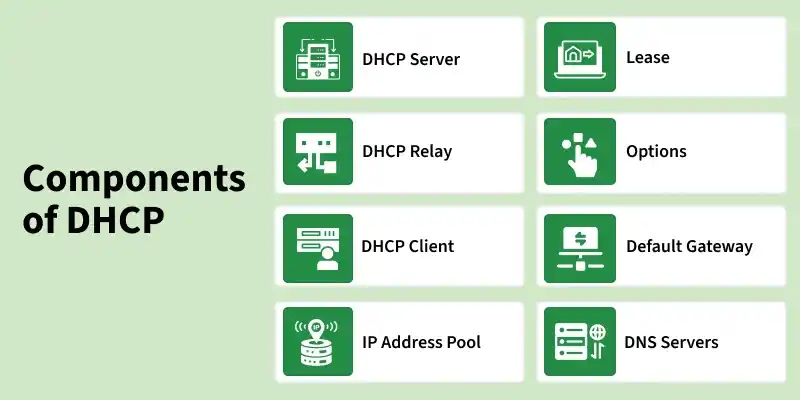
- DHCP Server: The device (router/server) that manages the DHCP service, keeps the IP pool, and assigns IP addresses + configuration to clients.
- DHCP Relay: A router/switch feature that forwards DHCP requests and replies between clients and the server when they are in different networks (different subnets).
- DHCP Client: Any device (PC, mobile, printer, IoT) that requests an IP address and settings from the DHCP server.
- IP Address Pool: The range of IP addresses available for allocation to clients (often with exclusions/reservations).
- Lease: The time period for which an assigned IP address is valid; the client must renew the lease to keep using it.
- DHCP Options: Additional configuration parameters provided by the DHCP server along with the IP address, such as DNS servers, domain name, NTP servers, and other network-specific settings.
- Default Gateway: The router IP given to the client so it can communicate outside the local network (reach the internet/other networks).
- DNS Servers: DNS addresses provided to the client so it can convert domain names (like google.com) into IP addresses.
DHCP Renewal: Lease renewal process
- Failover: Two DHCP servers share leasing; if one fails, the other continues service.
- Dynamic Updates: DHCP auto-updates DNS (A/PTR) when a client IP is assigned or changes.
- Audit Logging: Logs lease events (assign/renew/release) for tracking, troubleshooting, and audits.
Packet Format
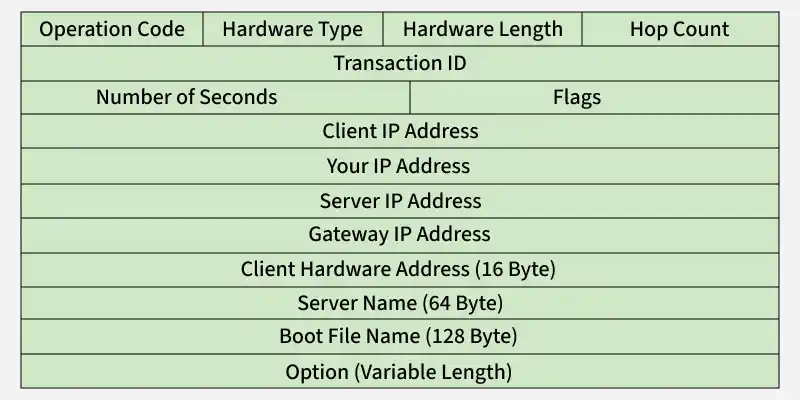
- Hardware Length (8 bits): Length of MAC address (e.g., 6 for Ethernet).
- Hop Count : Maximum number of hops the packet can travel.
- Transaction ID (32 bits): Set by client, used to match requests and replies.
- Number of Seconds (16 bits): Time elapsed since the client started booting.
- Flags (16 bits): Leftmost bit indicates broadcast reply requirement.
- Client IP Address (4 bytes): Filled if the client already has an IP, else 0.
- Your IP Address (4 bytes): Client IP assigned by the server.
- Server IP Address (4 bytes): IP address of the responding DHCP server.
- Gateway IP Address (4 bytes): Router IP address (if applicable).
- Client Hardware Address: The device’s MAC address.
- Server Name (64 bytes): Optional server hostname.
- Boot Filename (128 bytes): Pathname of boot file (for diskless clients).
- Options (variable): Vendor-specific or additional configuration.
Working
DHCP operates at the Application Layer and uses UDP ports 67 (server) and 68 (client) to automatically assign network configuration through a client-server communication process called DORA (Discover, Offer, Request, Acknowledge). The process involves the following steps:
1. DHCP Discover Message:
DHCP Discover is the first message sent by a DHCP client to check whether any DHCP server is available on the network and to start getting an IP address.
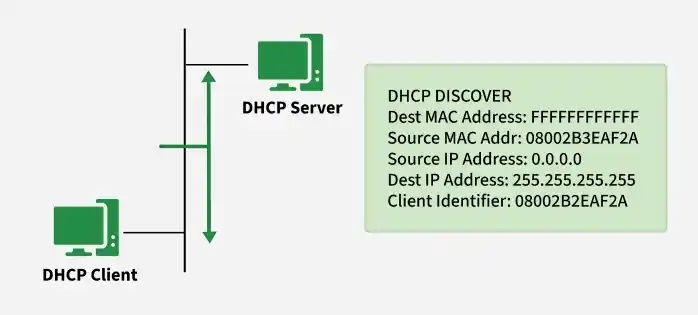
- Triggered when: A device connects to a network or boots up with no valid IP configuration.
- Transmission type: Broadcast, because the client does not know the DHCP server’s address.
- Purpose: Identify DHCP server(s) capable of assigning an IP and network parameters.
2. DHCP Offer Message
A DHCP server replies with an offer that includes an available IP address and configuration options (like subnet mask, gateway, DNS, and lease time).
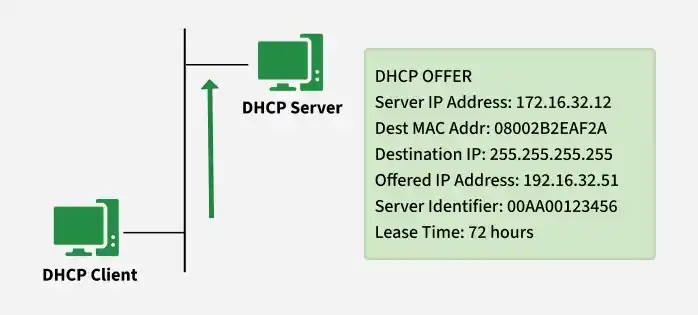
- Can be broadcast or unicast (depends on client/network behavior)
- Includes Server Identifier so the client knows which server sent the offer
- The offered IP is carried in yiaddr (“your IP address” field)
3. DHCP Request Message
DHCP Request is the message where the client confirms one chosen offer and asks the selected DHCP server to allocate that IP officially. It also tells other DHCP servers not to keep their offered IP reserved.
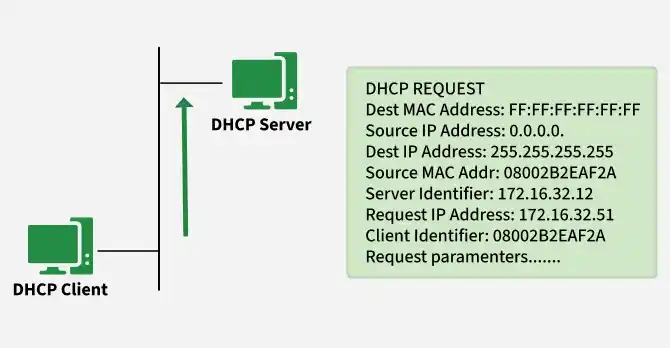
- Sent by: DHCP client
- When it is sent: After the client receives one or more DHCP Offer messages
- It accept one offered IP address and identify the selected server
- Prevent multiple servers from assigning different IPs to the same client
4. DHCP Acknowledgment Message
DHCP ACK is the final confirmation sent by the selected DHCP server after it receives the client’s DHCP Request. This message officially assigns the IP address to the client and provides the full set of network configuration parameters.
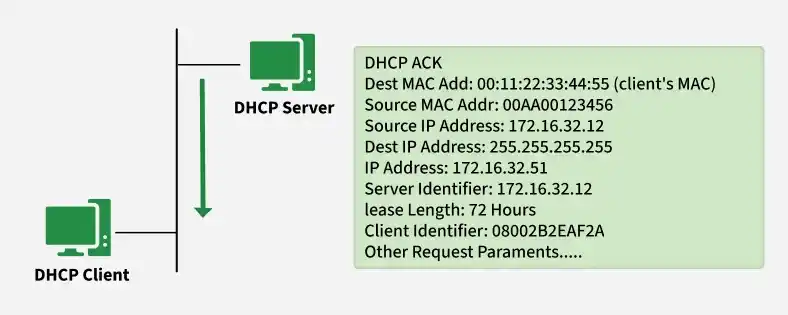
- Sent by: DHCP server
- When it is sent: After the server accepts the client’s DHCP Request
- Purpose: Confirm the lease and deliver final configuration so the client can start network communication.
5. DHCP Negative Acknowledgment Message
- DHCP NAK is sent by the server to notify the client that the requested IP configuration is invalid and cannot be assigned.
- Sent by: DHCP server
- Purpose: Reject the client’s DHCP Request
- Requested IP is outside the configured scope
- IP is already allocated to another device
- Client has moved to a different network
- Client must restart the DHCP process from Discover
6. DHCP Decline
- DHCP Decline is sent by the client when it detects that the offered IP address is already in use on the network.
- Sent by: DHCP client
- Purpose: Inform the server that the offered IP is not safe to use
- Typical trigger: Client detects an IP conflict using an ARP probe / gratuitous ARP
- Result: Server marks the IP as unavailable and selects another address for future allocation.
7. DHCP Release
DHCP Release allows a client to return its assigned IP address to the server before the lease expires.
- Sent by: DHCP client
- Purpose: Free the IP for reuse
- Occurs when a device disconnects, shuts down, or disables the interface
- Helps maintain efficient IP address utilization
8. DHCP Inform
- DHCP Inform is used when a client already has a manually configured (static) IP but needs additional network settings from the DHCP server.
- Sent by: DHCP client
- Purpose: Request configuration parameters like DNS, domain name, NTP, etc., without obtaining a new IP.
- Server response: Sends a DHCP ACK containing only configuration options.
- Delivery: Typically unicast, since the client already has a valid IP.
Security Concerns with DHCP
DHCP has no built-in authentication, so attackers on the same LAN can misuse it to disrupt service or redirect traffic.
- DHCP Starvation (IP Pool Exhaustion): Floods DHCP requests with spoofed MACs to consume all available leases, blocking legitimate clients.
- Rogue DHCP Server: A fake server gives clients incorrect IP settings (gateway/DNS), taking control of their network path.
- Man-in-the-Middle: Done by pushing attacker-controlled gateway/DNS via rogue DHCP to intercept or alter traffic.
- DNS Misuse: Malicious DHCP options can point clients to unauthorized DNS servers for redirection/phishing.
Protection Against DHCP Attacks
- Enable DHCP Snooping on switches and allow DHCP replies only on trusted ports.
- Apply Port Security or rate-limiting to reduce spoofed requests and prevent starvation.
- Use IP/MAC filtering + monitoring/log analysis to detect and block abnormal lease activity.