A Network Interface Card (NIC) is a hardware component that enables a computer or any device to connect to a network. It acts as an interface between the device and the network, allowing communication by sending and receiving data. Every device that needs network connectivity must have a NIC, which may be built into the system or installed as a separate card. The NIC uses a MAC address to identify the device on a network.
- NIC stands for Network Interface Card.
- It is also known as a network card, network adapter, or Ethernet card (for wired networks).
- NIC is a major and essential component required to connect a device to a network.
- Network devices such as switches also contain NICs to connect to networks.
- A NIC can be a circuit board or an expansion card installed in a computer or PC.
- NIC operates at:
Physical Layer (Layer 1) – signal transmission
Data Link Layer (Layer 2) – framing and MAC addressing
- Each NIC has a unique MAC address used for identification.
- In wired networks, a NIC converts data into electrical signals and vice versa (Ethernet).
- In wireless networks, a NIC converts data into radio signals and vice versa (Wi-Fi).
- NIC requires drivers to communicate with the operating system
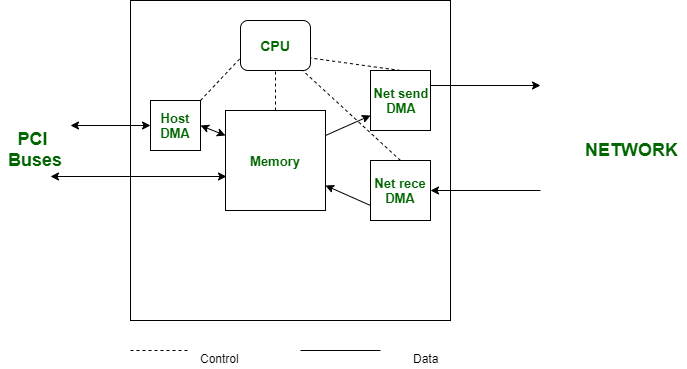
Characteristics of NIC
The main characteristics of a NIC describe how it identifies devices, connects to the network, and indicates network status.
1. Physical Network Address (MAC Address): Every NIC has a unique MAC address permanently assigned by the manufacturer. It is a 48-bit (6-byte) address used to uniquely identify a device on a network. The first half represents the vendor ID, and the second half uniquely identifies the device.
2. Network Connection Port: A NIC provides a network port to connect a device to the network medium, such as Ethernet or fiber. The port type must match the network cable being used.
3. Status Indicator Lights: NICs include LED indicators to show network status.
Link light confirms physical connection.
Activity light blinks during data transmission or reception.
Types of Network Interface Cards
There are two main types of NICs based on the type of network connection:
1. Wired NIC (Ethernet NIC): A wired NIC uses physical cables (such as Ethernet) to connect a device to a network. It was originally developed by Robert Metcalfe with the introduction of Ethernet technology. Wired NICs provide high-speed data transfer (up to 1 Gbps or more) and offer better security and stability compared to wireless connections. They are widely used in LAN, MAN and WAN networks, and are preferred for applications like gaming and video conferencing.
Examples: TP-Link TG-3468 Gigabit PCI Express Network Adapter, Integrated Ethernet NICs
2. Wireless NIC: A wireless NIC connects devices to a network using radio signals, commonly through Wi-Fi. These NICs provide mobility and portability and are often built into laptops, smartphones, and tablets. Wireless NICs can also be added externally using USB or internal adapter cards and support modern standards such as Wi-Fi 6.
Examples: Intel 3160 Dual-Band Wireless Adapter, Internal Wi-Fi Cards, USB Wi-Fi Adapters, Wi-Fi 6 Adapters
| Wired Network Interface Card (NIC) | Wireless Network Interface Card (NIC) |
|---|---|
| A wired NIC connects a system to a network through physical Ethernet cables. | A wireless NIC connects a system to a network using radio-frequency signals (Wi-Fi). |
| It provides a highly stable and reliable network connection. | It offers comparatively lower stability due to signal interference. |
| Wired NICs support higher data transfer speeds. | Wireless NICs generally provide lower data transfer speeds. |
| Data transmission is more secure because access requires a physical connection. | Wireless transmission is more susceptible to security risks and relies on encryption for protection. |
| It is commonly used in desktops, servers, and enterprise networks. | It is widely used in laptops, mobile devices, and portable systems. |
| Installation requires network cabling and dedicated ports. | Installation is simpler as no physical cabling is required. |
| Performance remains consistent regardless of distance within cable limits. | Performance decreases with increased distance and physical obstructions. |
| Wired NICs typically exhibit low latency. | Wireless NICs usually experience higher latency. |
| Example: TP-Link TG-3468 Gigabit PCI Express Network Adapter. | Example: Intel 3160 Dual-Band Wireless Adapter. |
A Network Interface Card (NIC) provides high-speed network communication, often supporting data transfer rates in gigabits per second. It offers a reliable and stable connection, especially in wired networks. A NIC allows multiple peripheral devices to connect to a network through different ports and enables efficient sharing of large amounts of data among multiple users, making it suitable for organizational and enterprise networks.
Wired NICs lack portability and flexibility because they require physical cables, unlike wireless networking solutions. Proper network configuration is necessary to achieve optimal performance, which can increase setup complexity. Additionally, if appropriate security measures are not implemented, data transmission over a network may be vulnerable to unauthorized access.