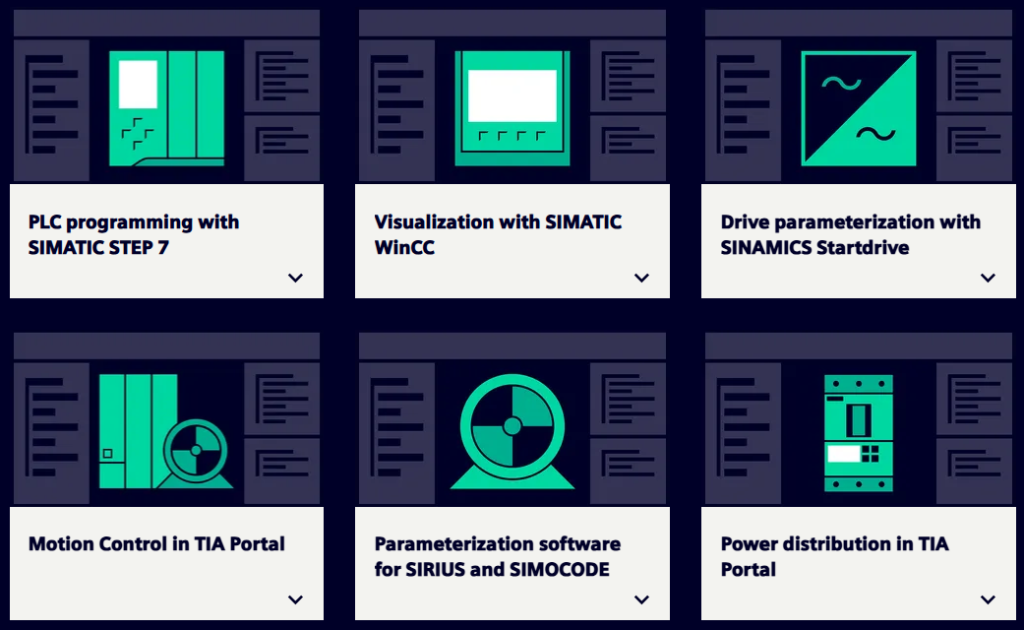
TIA Portal stands for Totally Integrated Automation Portal – a comprehensive engineering framework developed by Siemens to simplify the programming, configuration, and diagnostics of industrial automation systems. It integrates multiple tools in a single platform, allowing users to work on PLC programming, HMI design, network configuration, motion control, and even SCADA systems — all from one interface.
Originally introduced to replace the older STEP 7 and WinCC tools, TIA Portal offers a modern, user-friendly, and scalable environment tailored for both small and large-scale industrial applications.

Key Features of TIA Portal
All-in-One Platform
TIA Portal merges various automation tasks under one roof — PLC logic, HMI design, drives, safety, motion, and diagnostics.
User-Friendly Interface
Its drag-and-drop interface and intuitive layout reduce engineering time and improve project clarity.
Seamless Integration
Full integration with Siemens hardware, including S7-1200, S7-1500, ET 200, HMI Comfort Panels, and SINAMICS drives.
Advanced Diagnostics
Real-time system diagnostics help in early detection and correction of errors.
Multi-language Support
Engineers across the world can work in their native languages.

What Can You Do with TIA Portal?
1. PLC Programming
Write and simulate automation logic using Ladder (LAD), Function Block Diagram (FBD), or Structured Control Language (SCL).
2. HMI Design
Create user interfaces for Siemens HMI panels with screen navigation, buttons, graphs, and data logging.
3. Network Configuration
Configure PROFINET, PROFIBUS, and other industrial networks easily.
4. Motion Control
Implement positioning and speed control systems using Siemens servo drives.
5. Safety Programming
Develop safety logic using safety CPUs and adhere to SIL/PL standards.
6. Data Logging & SCADA Integration
Monitor and store critical process data with WinCC Runtime or WinCC Professional.

System Requirements for TIA Portal
Operating System (64-bit only)
- Windows 10 (Professional, Enterprise, Education) – Version 21H2 or higher
- Windows 11 (Professional, Enterprise, Education) – Recommended
- Windows Server 2019 / 2022 – Optional for enterprise setups
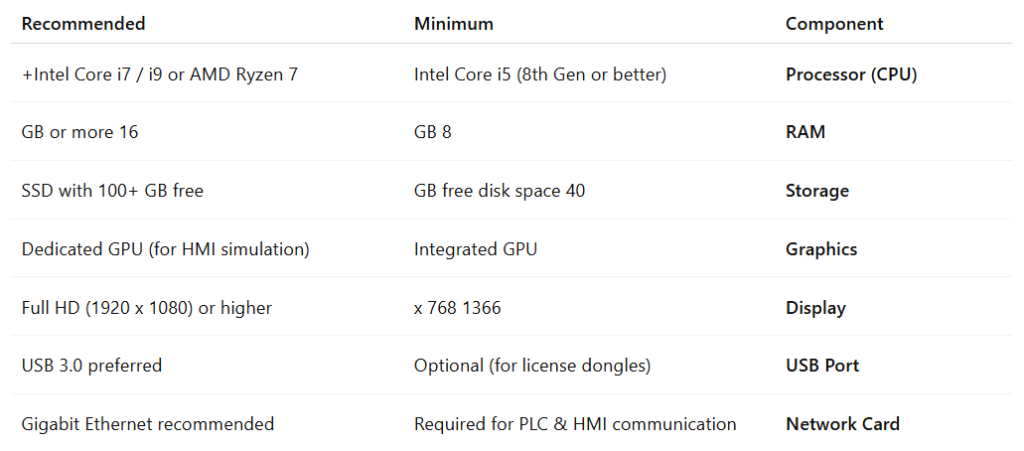
Hardware Requirements

Enable Windows Prerequisites for TIA Portal Installation
Before installing TIA Portal, it is recommended to enable several Windows features to prevent errors related to .NET, IIS, or communication services during setup. To do this, open Control Panel and go to Programs > Turn Windows features on or off. In the Windows Features window, enable .NET Framework 3.5, .NET Framework 4.8 Advanced Services, the required WCF Services, and if needed, Internet Information Services (IIS). Then click OK and let Windows install the required components. After the process is complete, restart your computer and then start the TIA Portal installation.

Software Download Link
+ TIA Portal STEP7 Prof Safety WinCC DVD2 V20 Download Video Tutorial
+ SIMATIC S7-PLCSIM V20 Download Video Tutorial
+ SIMATIC S7-PLCSIM Advanced V7 Download Video Tutorial
+ STARTDRIVE ADVANCED V20 Download Video Tutorial
+ SIMATIC WinCC Unified RT V20 Download Video Tutorial
+ SIMATIC WinCC Unified RT V20 SR1 Download Video Tutorial
+ SIMATIC SCADA-RT V20 Download Video Tutorial
+ TestSuiteAdvanced V20 Download Video Tutorial
+ SiVarc V20 Download Video Tutorial
+ SINAMICS DCC V20 Download Video Tutorial
+ SIMATIC STEP7 CFC V20 Download Video Tutorial
+ SIRIUS Soft Starter ES V20 Download Video Tutorial
+ SIRIUS SIMOCODE ES V20 Download Video Tutorial
+ SIRIUS Safety ES V20 Download Video Tutorial
