At first glance, Siemens seems to have a lot of WinCC options—and it’s totally normal to feel a bit confused. So let’s break it down. Generally, HMI design with Siemens falls into two main categories:
- HMI for Siemens operator panels like Comfort and Basic panels
- PC-based HMI/SCADA design, where everything runs on a Windows system or server—no physical HMI panel needed.
WinCC belongs to the second category. It allows you to build full graphical interfaces for your process that can be displayed on a regular monitor or a large screen in your control room. WinCC Explorer is part of this package, too.
What is WinCC?
SIMATIC WinCC by Siemens is one of the most widely-used tools in industrial automation—especially when it comes to monitoring and visualization. It’s a well-known name among electrical engineers and anyone working with PLCs.
One of WinCC’s biggest strengths is its scalability. Whether you’re working on a small project with a few users or a large, complex system with distributed components, WinCC can handle it. It helps engineers define, manage, and monitor every part of the process—visually and efficiently.
By using WinCC, you get complete visibility over your industrial processes directly through a modern Windows-based interface. It’s reliable, user-friendly, and highly configurable—designed to support everything from simple HMI projects to complex SCADA operations. In short: SIMATIC WinCC helps you bring clarity to your production.
Complete SCADA Overview
SIMATIC WinCC is Siemens’ powerful SCADA platform designed for complete control, monitoring, visualization, and data analysis in industrial environments. Whether you’re tracking real-time data, setting up advanced alarm systems, analyzing historical trends, or customizing your interface for operator ease, WinCC delivers it all in one scalable solution. From secure remote access and seamless integration with protocols like OPC UA and Modbus to high-level diagnostics, redundancy, and flexible engineering tools, this platform is built to meet the evolving needs of modern automation. In this section, we explore every key capability of WinCC—from data collection and visualization to maintenance, security, and system customization.

Data collection and monitoring
Real-time data: Collect, analyze, and monitor data in real-time. Seamless integration with different devices and protocols (S7, OPC UA, ModBus, and many more) is always guaranteed.
Everything at a glance: With WinCC, you can collect and visualize data from a variety of sources. The intuitive user interface allows you to immediately grasp important information, even in large quantities, and make the right decisions.
Any place, any time: With remote monitoring, your data is always available – anywhere in the world. With excellent security features, you can rest assured that they’re protected.
Visualization and presentation
More transparency: With its advanced technology, WinCC allows you to transform complex data into attractive and clear graphical representations. With seamless integration of 3D models, you can add additional visual effects to your representations.
Valid forecasts: Thanks to the intuitive user interface, you can visualize data in real time and identify trends and events at a glance – tailored to the needs of your users.
Customization: The flexible SVG library offers a variety of customizable elements and controls to meet your unique needs.
Secure Reporting: The advanced alarm and event management features allow you to immediately identify problems and respond efficiently.
More performance: By efficiently visualizing complex data, you can analyze it effectively – and thus increase efficiency and productivity.

Alerting and Events
Versatile alarm functions: With WinCC, you will no longer miss any important information and can react quickly and efficiently to alarms and events. This allows you to maintain control and an overview of your technical processes.
Convenient configuration: Flexible alarm configuration allows you to set alarms based on specific conditions and thresholds. For a differentiated response, WinCC allows you to configure alarm hierarchies, classes, and priorities.
History and statistics: In addition, WinCC provides detailed alarm histories and statistics to help analyze and optimize your processes.
Archiving and data analysis
Excellent data performance: WinCC’s built-in powerful database allows you to efficiently capture, store, and analyze even large amounts of data to gain valuable insights for your engineering processes.
Access and analysis: The integrated archiving system ensures reliable and high-performance storage and tracking of data, enabling precise analysis and troubleshooting.
Smart tools: WinCC has numerous data visualization and reporting tools that allow you to intuitively present your data and generate meaningful reports. Use advanced analytics such as trend curves, statistical evaluations, and event logs to optimize the performance of your assets.
Control and operate
Powerful control and monitor functions: WinCC allows you to precisely control and monitor your technical processes. The extensive functions allow versatile customization to your individual requirements.
Joy of Use: The intuitive user interface makes effective operation very easy.
Secure control: With functions such as alarm management, trend display and status visualization, you can maintain a reliable overview of your systems at all times.
Easy integration: Seamless connection with other systems allows you to automate comprehensively.

System security and protection
Assets and data protected: With WinCC, your systems are safe from unauthorized access, and your sensitive data is protected from manipulation or loss.
Clear access rights: The integrated user and rights management enables precise control of access rights and thus ensures that only authorized persons can access the systems.
Comprehensive security features: WinCC also offers a variety of security features such as firewall support, encrypted communication, and user activity logging.
Scalability and integration
Ready for growth: With WinCC, you can seamlessly expand and customize your system to meet the increasing demands of your plants. Whether you have a small application or a large distributed system, WinCC can be easily scaled to ensure optimal performance and efficiency.
Performance in every scenario: The built-in redundancy makes WinCC ideal for use in any industry and even critical environments.
Open architecture: WinCC offers extensive integration options to communicate seamlessly with other systems and protocols. The open architecture enables the connection of third-party software and support for standards such as OPC UA, REST, MQTT and more.
Adaptability and flexibility
Customizable: With WinCC, you can design your user interface and workflows according to your requirements. Flexible configuration options allow you to customize user interfaces, alarms, reports, and more.
Customized features: Take advantage of powerful features such as dynamic graphics, customizable controls, and custom scripts to personalize your system as you wish. With the help of online engineering, you can make numerous adjustments without interruption.
Smart communication: WinCC supports a variety of communication protocols, so you can communicate with different devices and systems without restrictions.

Maintenance and diagnostics
Maximum uptime: WinCC allows you to effectively maintain your equipment, quickly diagnose and resolve any problems, thereby minimizing equipment downtime.
Detailed diagnostics and analysis: The built-in diagnostic tools enable detailed analysis of system conditions, process variables, and error messages. Get accurate information about the health of your assets to minimize downtime and maximize uptime.
Optimized plant availability: WinCC offers a variety of integrated self-diagnostic options to ensure smooth operation for distributed systems.
Engineering and Configuration
Intuitive engineering: With WinCC, you can configure and adapt your systems easily and flexibly. The intuitive engineering tools enable fast and effective project development and implementation, without any programming effort.
Customization: Use faceplates to customize your SCADA applications and make them intuitive to use. Standardization allows you to optimize your processes and effectively complete repetitive tasks.
TIA Workflow integration: Thanks to seamless connectivity to the TIA portal, you benefit from a smart TIA workflow and can implement your projects even faster. WinCC can also be integrated into the entire SIMATIC ecosystem, making it a comprehensive system solution.
Key Features of Siemens SIMATIC WinCC
- 3D scene display in WinCC Runtime, WebUX, and WebNavigator
- Customizable 3D objects and camera movement
- Communication with IT devices and networks
- Scriptable with VBScript to extend functionality
- Built-in tools for diagnostics and monitoring
- Integrated alarm display within TrendControl
- Live project preview inside WinCC Explorer
- Independent system reporting and performance summaries
- Excellent scalability across small to large systems
- Various visualization packages for process control
- Remote diagnostics and monitoring tools (via internet and email)
- System login/logout messages and security tools
- Clean and modern user interface
- High compatibility with a wide range of automation systems
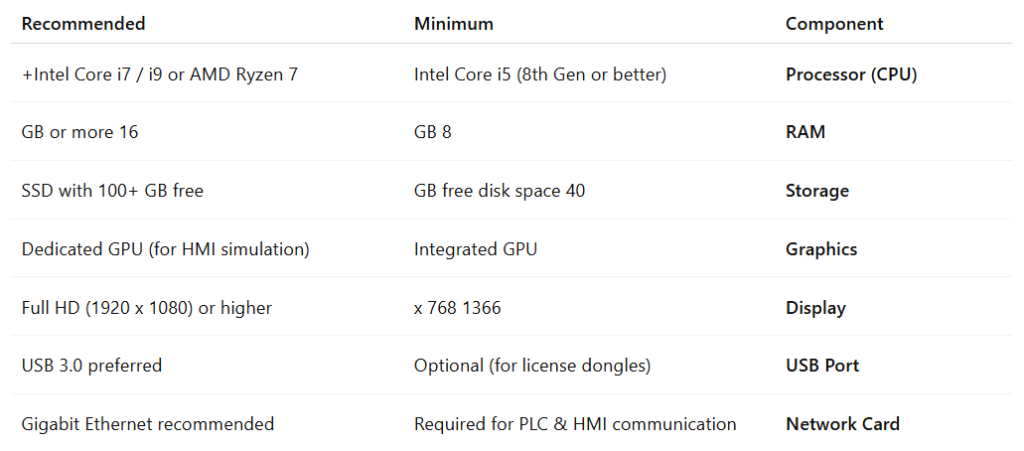
System Requirements for WinCC Explorer
Operating System (64-bit only)
- Windows 10 (Professional, Enterprise, Education) – Version 21H2 or higher
- Windows 11 (Professional, Enterprise, Education) – Recommended
- Windows Server 2019 / 2022 – Optional for enterprise setups